劍潭山親山步道位於捷運劍潭站旁
不論開車、騎車、或是搭乘大眾交通運輸都很方便到達
不過開車、騎車的話可能就要找一下車位
xiangyang17 發表在 痞客邦 留言(1) 人氣(6)
xiangyang17 發表在 痞客邦 留言(0) 人氣(9)

本文介紹如何在 VMware 上安裝 Ovirt Node
Node 類型Node 有兩種,一種是一般 Linux 並設定好 VDSM服務,一種為 Ovirt Node 專門當 Node 使用,使用一般 Linux 網路設定我還沒搞懂,因此僅先介紹 Ovirt Node 。
Ovirt Node 專門作為 hypervisor,檔案小,且安裝完之後系統為唯讀,因此系統較不容易掛掉。
Ovirt Node 取得Ovirt Node 取得也有兩種方式,一種是透過 Ovirt 工具,自己去 build 一個 ISO 出來,我搞了半天還是搞不出來,所以最簡單的,就是去 Ovirt 官網下載吧.....
我抓的是 2.6 beta 版,網址如下
http://resources.ovirt.org/releases/beta/iso/
要抓穩定版的,網址如下
http://resources.ovirt.org/releases/stable/tools/
因為我的 Ovirt 為 3.1,使用 2.5 版的好像會有問題,因此才改抓 2.6。
Ovirt Node On VMware安裝方式差不多,考慮到有些人是為了要作 Lab ,可能也沒那麼多機器,安裝在 VMware 是不錯的選擇
xiangyang17 發表在 痞客邦 留言(1) 人氣(889)
本文介紹如何在 CentOS 6 上安裝 Ovirt
參考網址:
http://wiki.centos.org/zh-tw/HowTos/oVirt
版本資訊:
CentOS 6.3 x64 (安裝 Ovirt 請使用 64bit)
系統需求:
硬體:
最少:擁有 4GB 記憶體的雙核伺服器、25 GB 磁碟空間及 1 Gbps 網絡介面。
建議:擁有 16GB 記憶體的雙插座/四核伺服器、橫跨多個轉軸的 50GB 磁碟空間及 1 Gbps 網絡介面。
引擎並不需要 CPU 提供虛擬化延伸。
管理存取:
之後會透過瀏覽器來設定,建議這台就專作 Ovirt 使用,避免其他不必要的問題
網路:
DHCP: 個人覺得可有可無,都設定固定IP即可
DNS: 之後的架構會與 AD 作整合,因此此部分可使用 AD 取代,另外要注意 DNS 需要能正反解,不然有些功能會無法使用。
Ovirt 主機上若有安裝 NetworkManager 請停用,改使用 network
設定步驟
設定 Ovirt yum 套件
[root@OvirtM-1 ~]# cd /etc/yum.repos.d
[root@OvirtM-1 yum.repos.d]# wget -q http://people.centos.org/hughesjr/ovirt31/ovirt.repo
更新 yum 並重開機
[root@OvirtM-1 yum.repos.d]# yum -y upgrade
[root@OvirtM-1 yum.repos.d]# shutdown -r now
安裝 Ovirt 套件
[root@OvirtM-1 ~]# yum -y install ovirt-engine
Ovirt 初始設定
[root@OvirtM-1 ~]# engine-setup
Welcome to oVirt Engine setup utility
In order to proceed the installer must stop the ovirt-engine service
Would you like to stop the ovirt-engine service? (yes|no): yes
是否要停止 ovirt-engine,請輸入 yes
oVirt Engine uses httpd to proxy requests to the application server.
It looks like the httpd installed locally is being actively used.
The installer can override current configuration .
Alternatively you can use JBoss directly (on ports higher than 1024)
Do you wish to override current httpd configuration and restart the service? ['yes'| 'no'] [yes] : yes
是否要複寫設定並重啟 httpd ,請輸入 yes
HTTP Port [80] : 80
請輸入 HTTP 的 Port
HTTPS Port [443] : 443
請輸入 HTTPS 的 Port
Host fully qualified domain name. Note: this name should be fully resolvable [OvirtM-1] : OvirtM-1.example.com
輸入 Ovirt 主機名稱
The IP 192.168.1.221 does not hold a PTR record for the FQDN: OvirtM-1.example.com
User input failed validation, do you still wish to use it? (yes|no): yes
輸入的名稱必須要能正反解,但有時好像會怪怪的,輸入 yes (確定在DNS設定正確)
Enter a password for an internal oVirt Engine administrator user (admin@internal) :
輸入管理介面 admin 的密碼
Warning: Weak Password.
Confirm password :
再輸入一次
Organization Name for the Certificate [OvirtM-1] : Example
憑證的組織名稱
The default storage type you will be using ['NFS'| 'FC'| 'ISCSI'| 'POSIXFS'] [NFS] :
預設的 storage 要使用哪一種,預設為 NFS
Enter DB type for installation ['remote'| 'local'] [local] :
使用遠端或本地DB,預設為本地
Enter a password for a local oVirt Engine DB admin user (engine) :
輸入DB的密碼
Warning: Weak Password.
Confirm password :
再輸入一次
Configure NFS share on this server to be used as an ISO Domain? ['yes'| 'no'] [yes] :
是否要設定 ISO Domain
Local ISO domain path [/var/lib/exports/iso] : /exports/iso
ISO Domain 的路徑
Firewall ports need to be opened.
The installer can configure iptables automatically overriding the current configuration. The old configuration will be backed up.
Alternately you can configure the firewall later using an example iptables file found under /etc/ovirt-engine/iptables.example
Configure iptables ? ['yes'| 'no']: no
是否要設定 iptables,請輸入 no
oVirt Engine will be installed using the following configuration:
=================================================================
override-httpd-config: yes
http-port: 80
https-port: 443
host-fqdn: OvirtM-1.example.com
auth-pass: ********
org-name: Example
default-dc-type: NFS
db-remote-install: local
db-local-pass: ********
nfs-mp: /exports/iso
config-nfs: yes
override-iptables: no
Proceed with the configuration listed above? (yes|no): yes
列出設定值,會問你是否要修改設定,輸入 yes 便開始設定
設定過程
Installing:
Configuring oVirt-engine... [ DONE ]
Configuring JVM... [ DONE ]
Creating CA... [ DONE ]
Updating ovirt-engine service... [ DONE ]
Setting Database Configuration... [ DONE ]
Setting Database Security... [ DONE ]
Creating Database... [ DONE ]
Updating the Default Data Center Storage Type... [ DONE ]
Editing oVirt Engine Configuration... [ DONE ]
Editing Postgresql Configuration... [ DONE ]
Configuring the Default ISO Domain... [ DONE ]
Configuring Firewall (iptables)... [ DONE ]
Starting ovirt-engine Service... [ DONE ]
Configuring HTTPD... [ DONE ]
**** Installation completed successfully ******
(Please allow oVirt Engine a few moments to start up.....)
**** To access oVirt Engine browse to http://OvirtM-1.example.com:80 ****
Additional information:
* There are less than 4096 MBs of available free memory on this machine.
It is recommended to have at least 4096 MBs of available memory to run the oVirt Engine.
* oVirt Engine CA SSL Certificate SHA1 fingerprint: 2C:1A:16:24:C5:E5:E9:16:2C:72:E2:91:6B:3F:02:EA:A8:64:9A:EF
* SSH Public key fingerprint: bd:db:67:f7:c3:82:e4:f8:f3:1a:ab:3b:f9:25:1b:75
* A default ISO share has been created on this host.
If IP based access restrictions are required, please edit /exports/iso entry in /etc/exports
* oVirt Engine requires the following TCP/IP Incoming ports to be opened on the firewall:
22, 80, 443
* an example of the required configuration for iptables can be found at: /etc/ovirt-engine/iptables.example
* The installation log file is available at: /var/log/ovirt-engine/engine-setup_2013_02_14_22_49_46.log
* Please use the user "admin" and password specified in order to login into oVirt Engine
* To configure additional users, first configure authentication domains using the 'engine-manage-domains' utility
修正旋轉替換日誌的問題。
sed -i 's/`;/ 2>\/dev\/null`;/' /usr/share/ovirt-engine/scripts/ovirtlogrot.sh
至此,Ovirt 便安裝完成。
xiangyang17 發表在 痞客邦 留言(0) 人氣(463)

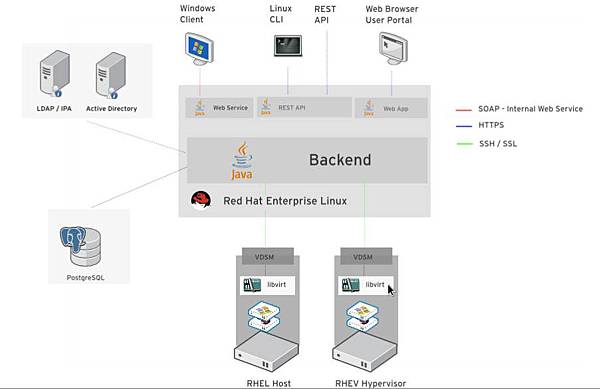
前一篇簡單介紹了 Red Hat 的虛擬化產品,其實 Red Hat 的虛擬化產品是以 KVM 為底層並使用 Ovirt 為管理中心,透過 Ovirt 去管理每個使用 KVM 虛擬的機器,這就像是VMware 裡的 vCenter 與 vSphere ESXi 的關係。
上圖是 RHEV 的架構圖,可從幾個面向來看:
管理中心: 中間為管理中心,也就是 Ovirt 的所在,透過 Ovirt 去設定管理哪些 node 要加入管理、使用那些資源(Storage)、使用者管理,管理介面為網頁介面,並須支援 Java
管理介面: Administrator Portal: 管理者所使用,能使用完整的功能 (目前須使用 IE)
User Portal: 一般使用者使用,僅能使用指定的功能 (可使用 Firefox)
使用者: 支援 LDAP 與 AD 的使用者
資料庫: 預設使用 Postgresql
Node: 運算節點,可想成是ESXi,在此只要開啟 KVM 功能即可,可使用 Ovirt Node 的安裝光碟,或是使用一般發行的 Linux 並開啟虛擬化功能以及安裝 VDSM 便可當運算節點。
Ovirt 官網
http://www.ovirt.org/Home
Ovirt Node
http://www.ovirt.org/Category:Node
xiangyang17 發表在 痞客邦 留言(0) 人氣(255)
近幾年來虛擬化一直都很夯, 在open source 當然也不會缺席, 常見的大概有 xen 與 KVM。
RHEL 5.x 開始內建虛擬化功能, 但為 xen,5.4 之後改為KVM,其實是KVM與 Xen並存。
xiangyang17 發表在 痞客邦 留言(0) 人氣(425)

2012.09.13 Nikon 發表了新一代的中階全片幅機種 D600
xiangyang17 發表在 痞客邦 留言(0) 人氣(365)

台北水沙連 實際上是在觀音坑溪橋附近
景色有那麼一點像水沙連 因而被攝友們這樣稱之
關於台北水沙連底下的網址有詳細的介紹 有興趣的可以參閱
xiangyang17 發表在 痞客邦 留言(0) 人氣(1,499)

新北大橋 台灣第八座斜張橋
也是亞洲最長的斜張橋
新北大橋的落成 讓三重新莊一帶的堤防增色不少
xiangyang17 發表在 痞客邦 留言(0) 人氣(1,593)
趕流行也去考了 VCP,來說說相關的心得.........
VCP
VMware Certified Professional 顧名思義就是 VMware 所出的認證,這算是入門等級的證照,必須要會 VMware ESXi server 的安裝, 設定, 管理等等。
xiangyang17 發表在 痞客邦 留言(5) 人氣(1,089)